Headshot vs Portrait: What Is the Difference?
Headshot vs portrait: the real difference in framing, purpose, and when to use each for professional or creative needs.
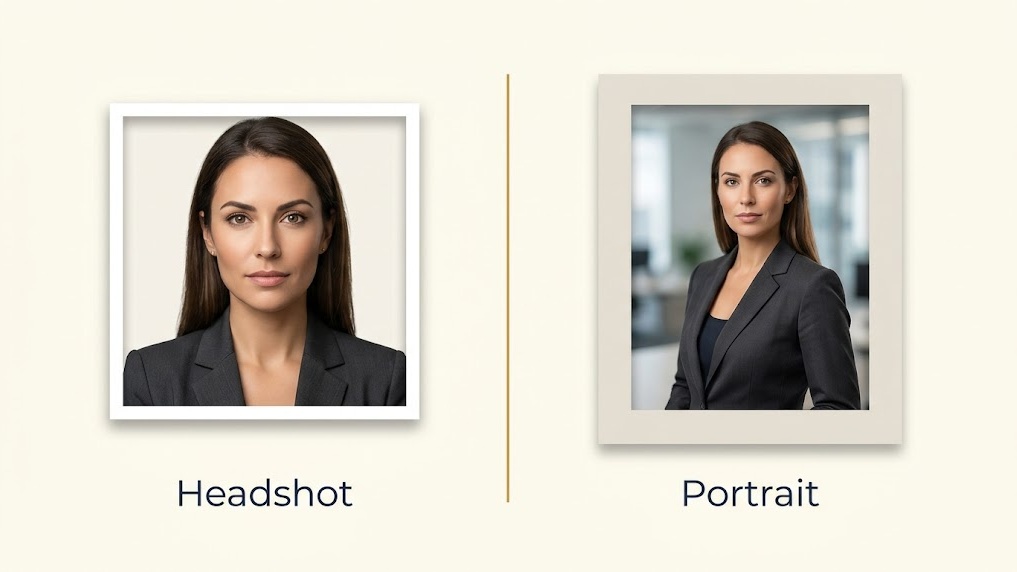
Table of Contents
These two words get used interchangeably. They shouldn't.
A headshot and a portrait are different types of photos with different purposes. Using the wrong one in the wrong context is a simple mistake that's easy to avoid once you understand what each is for.
The Technical Difference
The clearest difference is framing.
A headshot is cropped tightly. Head and shoulders, plain background, clear face. It's a professional identification photo. Nothing in the frame is meant to distract from who you are.
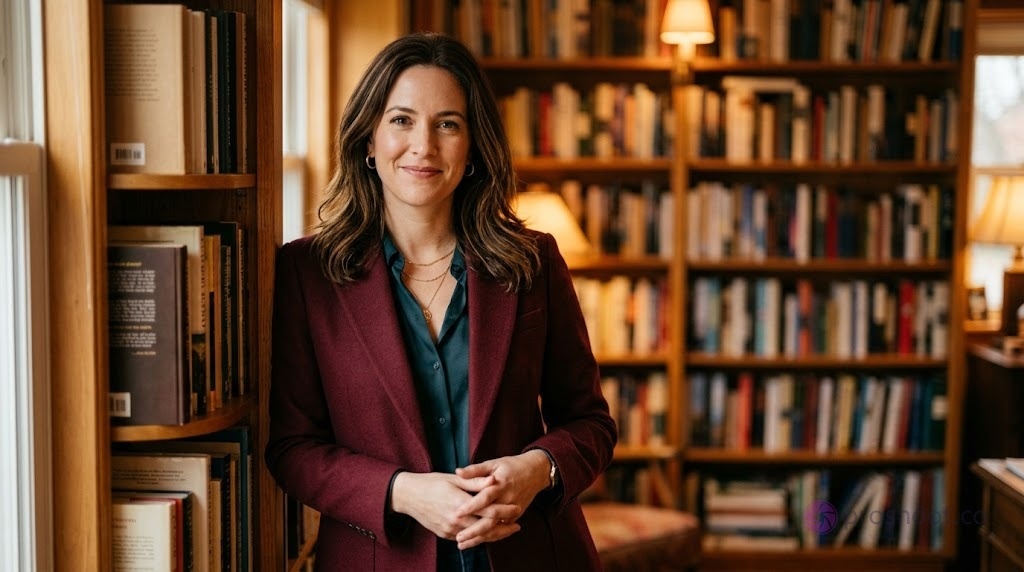
A portrait can include more of the body, the environment, or storytelling elements. Half-body, full-body, or environmental portraits all fall under this category.
| Headshot | Portrait | |
|---|---|---|
| Framing | Head and shoulders | Half body, full body, or environmental |
| Background | Plain or neutral | Can include setting, context, props |
| Purpose | Professional identification | Storytelling, branding, editorial |
| Lighting | Consistent, even | More flexible and creative |
| Where used | LinkedIn, company page, resume | Author bio, speaker page, branding |
When to Use a Headshot
Use a headshot when the context is professional and the goal is identification.
LinkedIn profiles are the clearest example. The photo displays as a small circle. Its only job is to help people recognize you quickly.
Other contexts where a headshot is the right choice:
- Company website team page
- Email signature
- Resume or CV
- Business card
- Conference speaker listing
- PR contact page
The tight crop and plain background work specifically because there's no distraction. The viewer sees your face immediately.
When to Use a Portrait
Use a portrait when the goal is to communicate more than just who you are.
Author bios often use portraits. A speaker standing in a library or at a whiteboard tells a story. A branding photo for a consultant might include their desk, their tools, their environment.
Portraits work better for:
- Author bios on book covers and websites
- Personal branding pages
- Editorial coverage in publications
- Creative professional websites
- Speaker pages where personality matters
See professional headshot examples and creative headshots to compare how these look in practice.
Can One Photo Work as Both?
Sometimes. It depends on the crop.
If you have a high-resolution portrait that includes your head and shoulders cleanly, you can crop it to function as a headshot. The background needs to be simple enough and the face needs to be sharp.
What typically fails:
- Environmental portraits where the background is busy
- Portraits where the subject is looking away
- Full-body shots where the face is too small at thumbnail size
If in doubt, use the headshot version for professional platforms and keep the portrait for contexts where personality and environment add value.
👉 For corporate headshots and LinkedIn headshots, stick with the headshot format.
How AI Tools Handle This
Most AI headshot tools generate headshots, not portraits. They're built for the professional identification use case.
Some tools offer wider framing options for creative professionals. If you need a half-body result, check the tool's output samples before committing.
Best AI headshot generators covers which tools are best suited to which use cases.
For tips on what makes AI results look genuinely professional, see what makes an AI headshot look professional.
Need a professional headshot that fits any platform? Proshoot generates multiple styles in a single session: tight headshots for LinkedIn, wider formats for creative profiles.
Frequently Asked Questions

Fazil
Content Writer