What Makes an AI Headshot Look Professional?
Learn what makes an AI headshot look professional, realistic, and business-ready, plus which photos to upload and what mistakes to avoid.
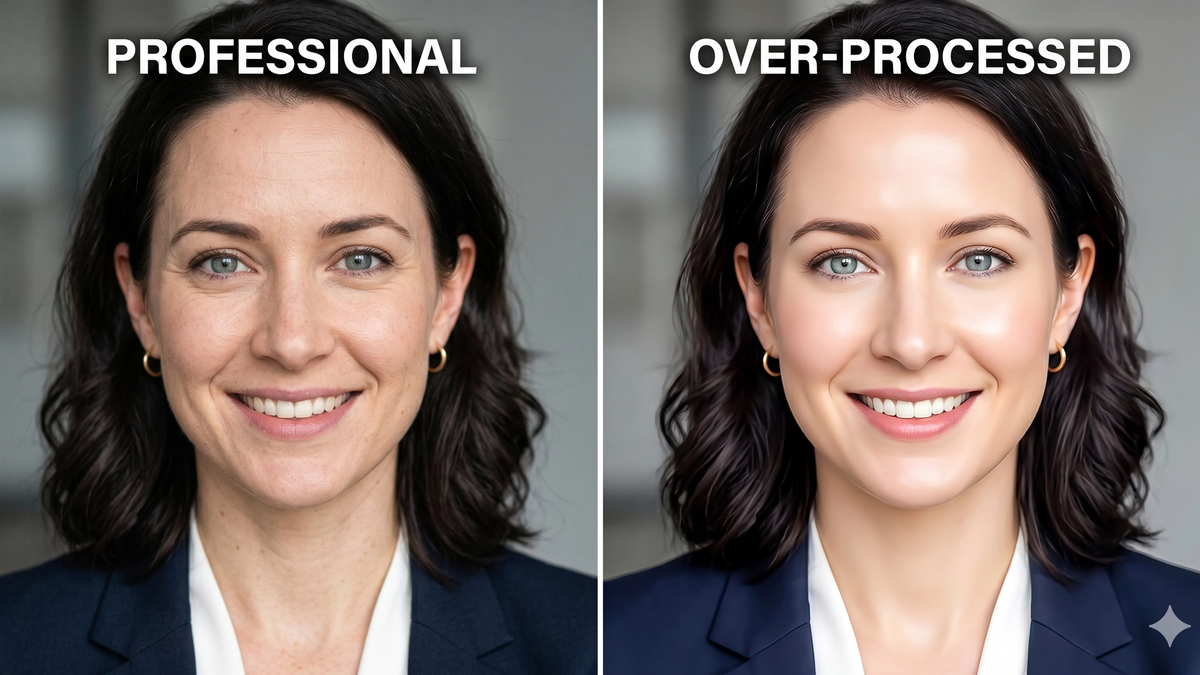
Table of Contents
A polished AI headshot is not always a professional one.
Some images look impressive for two seconds, then fall apart the moment you zoom in or compare them to how the person really looks. That is the difference between style and credibility.
If you want to use an AI headshot on LinkedIn, a company page, a founder bio, or client-facing material, it needs to do more than look nice. It needs to look believable.
This guide pulls the most useful advice from our overlapping AI headshot posts into one place. It covers what professional really means, how to check realism, what source photos work best, and what business users should watch for before publishing.
TLDR
- ✅ A professional AI headshot looks like you, not an upgraded version of you.
- ✅ Sharp eyes, real skin texture, clean clothing, and a simple background matter most.
- ✅ Good results usually start with recent, well-lit source photos from different angles.
- ❌ Glassy eyes, waxy skin, warped clothing, and fake office backgrounds kill trust fast.
- ❌ The most flattering image is not always the most credible one.
- 👉 If the headshot would feel normal on a video call, you are probably close.
What makes an AI headshot look professional?
Professional does not mean perfect.
It means someone can see the image and trust it quickly.
A strong AI headshot should feel:
- current
- believable
- appropriate for the role
- clear at small and large sizes
That is the standard I would use for any professional platform, whether it is a recruiter scanning LinkedIn or a client reading your bio.
If you want to compare this against real-world business portraits, these headshot examples make the differences easier to spot.
The 7 things that matter most
1. Face clarity
The eyes should look sharp.
The expression should feel calm and natural.
The skin should still have texture.
If the face starts looking fake when you zoom in, the headshot is not professional enough for real use.
2. Likeness
The image should still look like you in real life.
Not a younger version. Not a thinner version. Not a heavily cleaned-up version that needs explaining.
Why it matters: people will eventually meet you on a call or in person. If the headshot creates a mismatch, trust drops immediately.
3. Clothing that fits the role
Clothing should match the professional context.
A consultant, lawyer, recruiter, startup founder, and sales rep may all dress a little differently, but the same principle holds: the outfit should support trust, not distract from it.
Good defaults usually include:
- solid colors
- simple necklines
- clean collars
- neutral layers
- no logos or loud patterns
If you need more detailed outfit guidance, this what to wear for headshots guide covers the basics well.
4. Background simplicity
The best professional backgrounds are the ones you barely notice.
Soft gray, off-white, or subtle neutral backdrops usually work best. Fake office scenes, busy rooms, and trendy gradients often make the image feel less serious.
For a deeper breakdown, see headshot backgrounds.
5. Crop and framing
Professional headshots usually work best when the face fills about 60 to 70 percent of the frame.
Too tight feels cramped. Too loose makes your expression hard to read, especially on mobile or in a small thumbnail.
6. Grooming and polish
Hair should look intentional.
Facial hair should look neat if present.
Makeup, retouching, and cleanup should help the image feel polished, not plastic.
7. Overall context
The same headshot will not fit every use equally well.
For LinkedIn headshots, approachability matters. For executive headshots, authority matters more. For corporate headshots, consistency across the team matters a lot.
How to tell if an AI headshot looks real
Some AI headshots look fine at thumbnail size and strange at full size.
That is why realism checks matter.
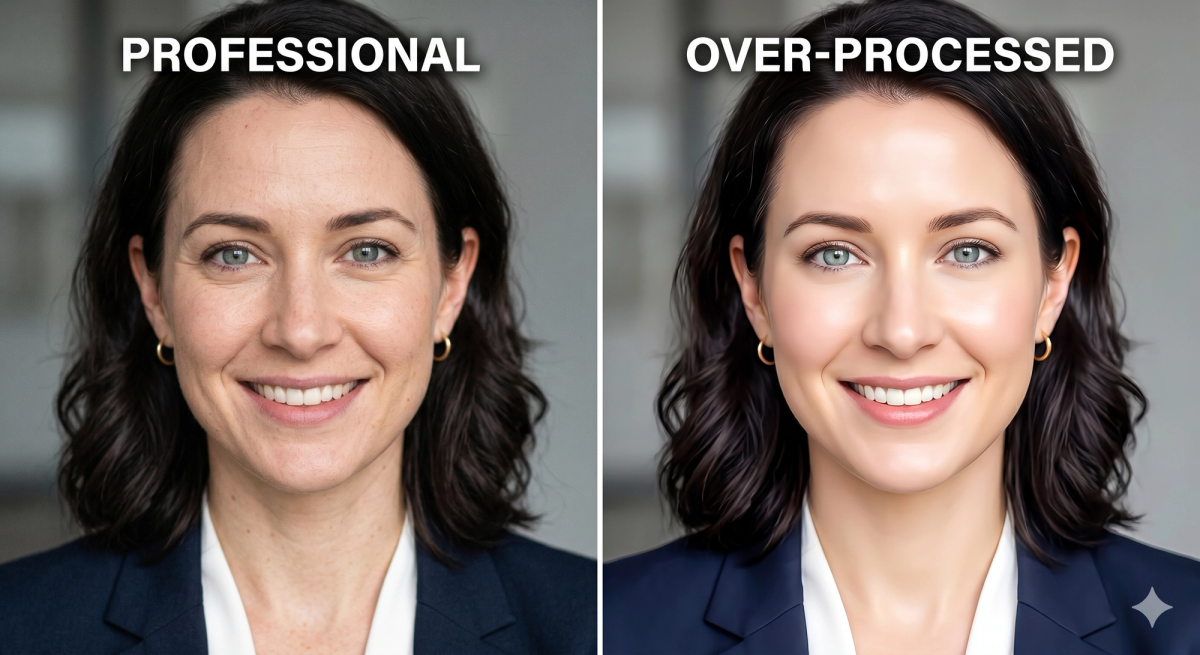
Eyes
This is one of the first places people notice something is off.
Check for:
- uneven gaze
- flat or glassy irises
- lifeless reflections
- blurry eyelash edges
Real eyes have depth. Fake-looking eyes often feel empty.
Teeth and smile
Teeth should not look too perfect.
If every tooth looks identical, overly bright, or slightly melted together, the image starts feeling generated.
A natural smile usually has small asymmetries. That is normal.
Hairline and edges
Hair is hard for AI to render well.
Zoom in on the hairline, jawline, and areas around the ears. If the strands blur into the skin or background, the image loses realism fast.
Ears, glasses, and jewelry
These small details reveal a lot.
Look for:
- asymmetrical ears
- broken earring shapes
- warped glasses frames
- missing bridge or temple details
If the accessories look wrong, people notice even if they cannot explain why.
Skin texture
Professional skin should look clean, not waxy.
If pores, variation, and normal texture disappear completely, the headshot may look polished at first but fake under inspection.
Clothing edges
Collars, lapels, seams, and fabric texture matter more than people think.
If one collar point is soft and the other is sharp, or the fabric looks melted or textureless, the image loses business credibility.
Tip: open the headshot on a desktop screen and zoom in before publishing. If it still feels normal, that is a very good sign.
What kind of source photos work best for AI headshots?
Most bad AI headshots start with bad uploads.
You do not need studio photos to get good results, but you do need clear and recent photos that show your real face well.
What works best
Good source photos are usually:
- recent
- well lit
- clear and in focus
- taken from a few angles
- mostly consistent in hairstyle, facial hair, and glasses
Window light, overcast daylight, and clean indoor lighting usually work well. Heavy filters and dark nightclub photos do not.
The best types of photos to upload
Useful upload types include:
- clean selfies taken near a window
- casual portraits taken by another person
- recent phone photos in good daylight
- existing professional photos that still look like you
You want variety in angle and expression, not randomness in appearance.
How many photos to upload
Most tools work best with about 8 to 15 source images.
If the tool allows it, 10 to 12 is usually a good target.
That gives the model enough information without relying too heavily on a tiny set of similar selfies.
What to avoid
These uploads usually create worse results:
- group photos
- filtered Instagram photos
- very old images
- screenshots
- heavy shadows
- hats or face obstructions
- only extreme side angles
Why it matters: the AI can only learn from what you give it. If the inputs are confusing, the outputs usually are too.
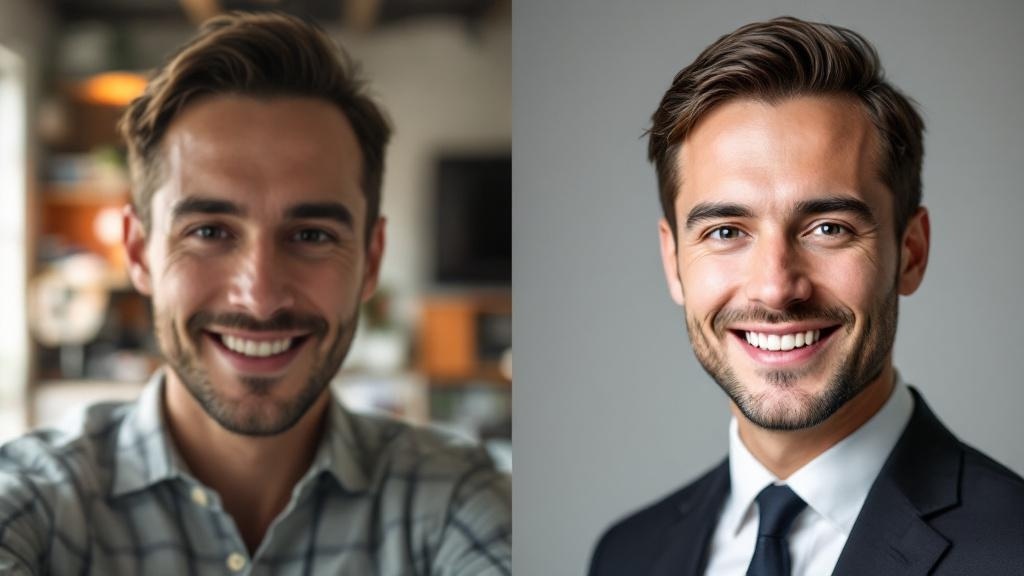
If you only have selfies
That is fine.
Selfies can work very well if they are:
- taken in daylight
- sharp and unfiltered
- held near eye level
- shot against a simple background
- slightly varied in angle
Bottom line: good selfies beat bad professional photos.
What professionals should look for in a business-ready AI headshot
There is a difference between a professional-looking image and a business-ready one.
A business headshot should signal trust before style.
That matters even more if the image will appear on:
- a company website
- a founder page
- a consulting site
- a team directory
- client-facing sales material
Trust before beauty
The most flattering image is not always the one you should publish.
For business use, credibility matters more than glamour.
If the image looks too styled, too youthful, or too edited, people may trust it less even if it looks visually impressive.
Role fit matters
A business headshot should match the role and market.
Examples:
- executives usually need more polish and authority
- consultants need warmth and credibility
- corporate teams need consistency
- sales roles benefit from approachability
If you are evaluating a headshot for a company page, ask whether it would feel normal next to your colleagues' photos.
Team consistency matters too
If one person has a dramatic background, stronger retouching, or a very different crop, the whole team page feels less coherent.
Strong business headshots tend to share:
- similar framing
- similar lighting
- similar background style
- similar level of formality
What makes an AI headshot look polished but not professional
This is where many tools miss the mark.
Common failure points include:
- over-smoothed skin
- fake-looking office backgrounds
- dramatic blur
- clothing that does not fit the role
- a smile that feels forced
- choosing the most glamorous version instead of the most believable one
Why it fails: the image may look "good" in a vague sense, but it does not look like a real person you would trust in a professional setting.
A quick checklist before you publish
Before you use an AI headshot professionally, check this:
- Does it still look like me?
- Would I recognize this person on a video call?
- Do the eyes hold up when I zoom in?
- Does the skin look natural?
- Does the clothing fit my role?
- Is the background simple and believable?
- Does the crop still work at thumbnail size?
- If this is for work, would it look normal on my team page?
If the answer is no to any of these, keep looking.
Final thoughts
The best AI headshots do not win because they look dramatic.
They win because they look normal in the right way.
If the photo looks like you on a good day, fits your role, and still feels believable when someone zooms in, it is probably strong enough to use. If you want examples built for real professional use, start with corporate headshots.
Frequently Asked Questions

Fazil
Content Writer